This guide walks you through creating a free-to-run website powered by:
Vercel – frictionless frontend hosting
Cloudflare R2 – affordable object storage
Astro – a hybrid static + island architecture framework
Filament + Laravel – a lightning-fast admin panel
GitHub + Actions – automated deployment pipelines
DDEV – local dev environment, clean & portable
Let’s break it down step by step the GV-Lab way: clean workflow, pixel-sharp decisions, zero-waste code.
1. Detecting What Vercel Can Do for You
Vercel is a high-performance hosting platform with a simple mission: deploy instantly, scale automatically, pay nothing until you grow.
Why Vercel fits a pixel-tech workflow
⚡ One-click deployments
🔁 Seamless GitHub connections
🌍 Automatic global CDNs
🧩 Perfect for Astro, Next.js, Svelte, Vue, static sites
🆓 Free tier for personal projects
For the frontend part of your project, Vercel is practically the ideal launchpad.
We’ll use it to host Astro and handle auto-deployment via GitHub.
2. Cloudflare R2 — The Smart Way to Store Images
Image and asset storage is where most “free hosting” projects hit limitations.
Enter Cloudflare R2:
Why Cloudflare R2 works beautifully with Vercel
💾 No egress fees (you won’t get billed for downloads)
🪶 S3-compatible API
🆓 Free tier generous for small sites
🚀 Extremely fast through Cloudflare’s global edge
Use cases in your stack
Astro image storage
Admin uploads from Filament
CDN-served static assets
You’ll essentially use R2 as a global image bucket that talks easily with your front-end and Laravel API.
3. What is Astro? And Why GV Lab Chooses It
Astro is a modern front-end framework designed for speed — not bloat.
How Astro Works
Ships zero JS by default
Supports “Islands Architecture” — interactive components load only where needed
Can embed React, Vue, Svelte, Solid, and others inside the same project
Perfect for content sites, landing pages, blogs, marketing sites
Astro vs. Modern Frameworks
Feature | Astro | Next.js | Nuxt | Vue/SvelteKit |
|---|---|---|---|---|
JS by default | ❌ No | ✔ Yes | ✔ Yes | ✔ Yes |
Multi-framework support | ✔ | ❌ | ❌ | ❌ |
Best for content sites | ⭐ Excellent | Good | Good | Good |
Server rendering | Optional | Yes | Yes | Yes |
Astro is a precision framework — like pixel art: minimal, sharp, intentional.
4. Filament + Laravel — The Admin That Works for You
For the backend admin, Filament (built on Laravel) is the fastest way to get an admin panel that’s:
Clean
Beautiful
Fast to build
Plugin-ready
Fully customizable
Why Filament Fits This Stack
Simple forms for managing content
Media upload integration (Cloudflare R2 compatible via Flysystem)
Can be hosted cheaply or via Render/Docker
You’ll use Filament for your CMS/admin while Astro handles the frontend.
5. Step-by-Step Setup (GV Lab Edition)
Step 1 — Create Your GitHub Repository
Go to GitHub → New Repository
Name it e.g.
pixel-astro-adminInitialize with README
Clone it locally
Step 2 — Initialize Astro
npm create astro@latest
Choose:
Template: “Blog” or “Minimal”
Typescript: “Yes”
Install dependencies: “Yes”
Then push it to GitHub:
git add .
git commit -m "init astro project"
git push
Step 3 — Connect Astro Repo to Vercel
Open Vercel
“Add New Project”
Choose your GitHub repo
Vercel auto-detects Astro
Deploy
Congratulations — your frontend is live globally in 30 seconds.
6. Step 4 — Auto-Deployments with GitHub Actions
Vercel automatically redeploys whenever you push changes, but you can add custom workflows if needed.
A simple sample .github/workflows/deploy.yml looks like:
name: Deploy Astro
on:
  push:
    branches: [ main ]
jobs:
  build:
    runs-on: ubuntu-latest
    steps:
      - uses: actions/checkout@v3
      - uses: pnpm/action-setup@v2
      - run: pnpm install
      - run: pnpm build
Vercel finalizes deployment automatically.
7. Step 5 — Build Your Laravel + Filament Backend (via DDEV)
Install Laravel with DDEV
ddev config --project-type=laravel --php-version=8.2 --create-docroot
ddev start
ddev composer create laravel/laravel .
Install Filament
ddev composer require filament/filament:"^3.0"
php artisan make:filament-user
Access your admin at:/admin
Clean, pixel-smooth admin ready.
8. Step 6 — Connect Filament to Cloudflare R2
Add a new disk to config/filesystems.php:
'r2' => [
    'driver' => 's3',
    'key' => env('R2_KEY'),
    'secret' => env('R2_SECRET'),
    'region' => 'auto',
    'bucket' => env('R2_BUCKET'),
    'endpoint' => env('R2_ENDPOINT'),
],
Use this disk in Filament:
->disk('r2')
Now your admin uploads images straight to R2 with global delivery.
9. Step 7 — Integrating Astro with Filament API
For content from Laravel:
Create API routes in
/routes/api.phpUse Astro
fetch()to pull posts/products/settingsCache data or generate static pages for extra speed
Astro + Laravel becomes:
Astro = UI/Frontend
Laravel = API/Admin
A perfect hybrid.
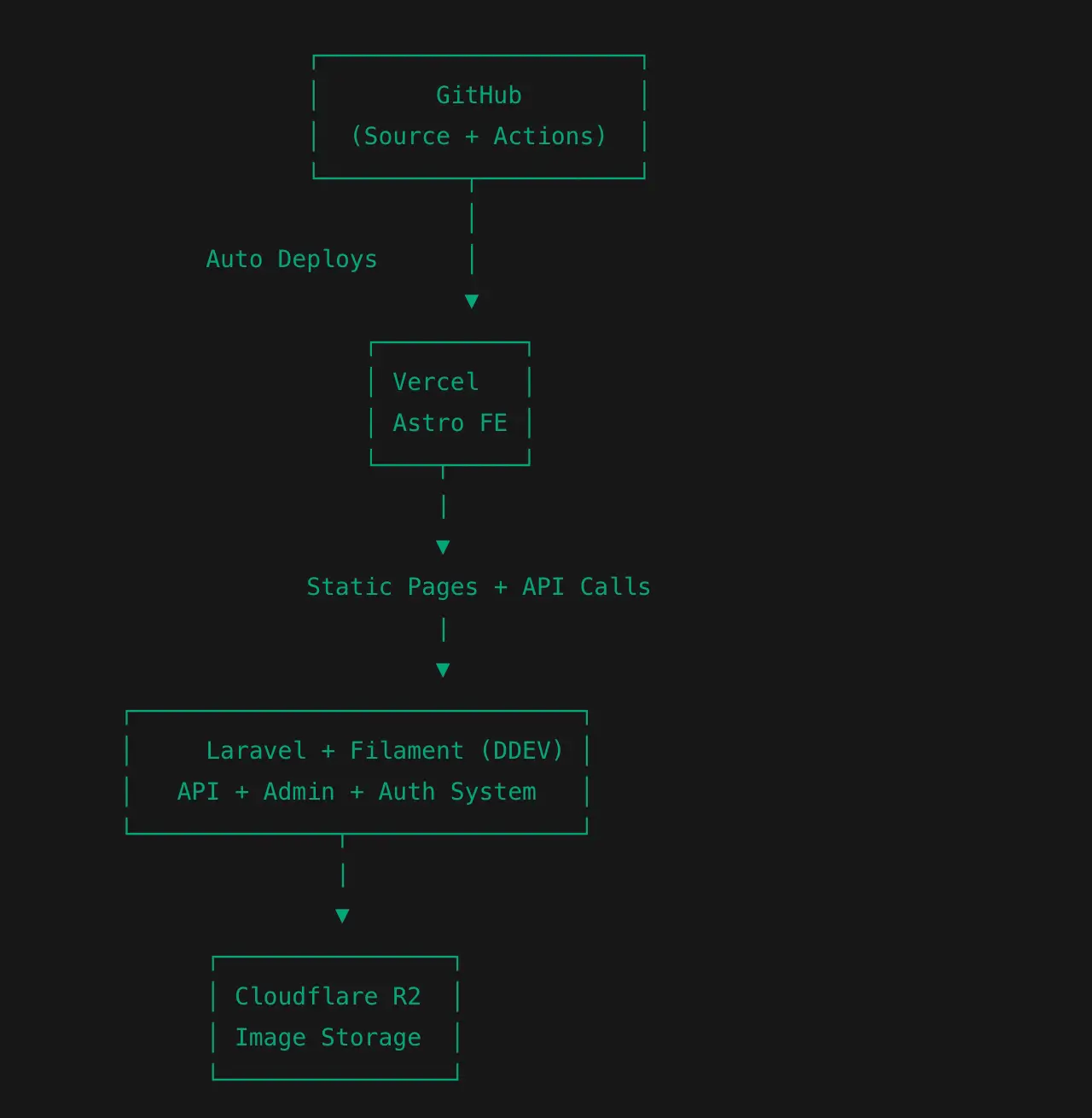
10. Final Pixel-Sharp Architecture
                    ┌──────────────────────┐
                    │        GitHub        │
                    │  (Source + Actions)  │
                    └──────────┬───────────┘
                               │
             Auto Deploys      │
                               ▼
                        ┌──────────┐
                        │ Vercel   │
                        │ Astro FE │
                        └────┬─────┘
                             |
                             ▼
                    Static Pages + API Calls
                             |
                             ▼
       ┌───────────────────────────────┐
       │     Laravel + Filament (DDEV) │
       │   API + Admin + Auth System   │
       └──────────────┬────────────────┘
                      |
                      ▼
             ┌────────────────┐
             │ Cloudflare R2  │
             │ Image Storage  │
             └────────────────┘
A modern stack that stays free, fast, and globally scalable.
Conclusion — Build Fast, Build Lean, Build Pixel-Sharp
With Vercel + Astro + Cloudflare R2 + Filament, you get a stack that is:
✨ Speed-focused
⚡ Ultra-light
🧩 Modular
💸 Mostly free
🔥 Perfect for modern websites, portfolios, and mini-SaaS
At GV Lab, this is our signature architecture for building smart, scalable web systems without noise or complexity.